Getting Started with TNC Quiz: A Simple Guide for New Users
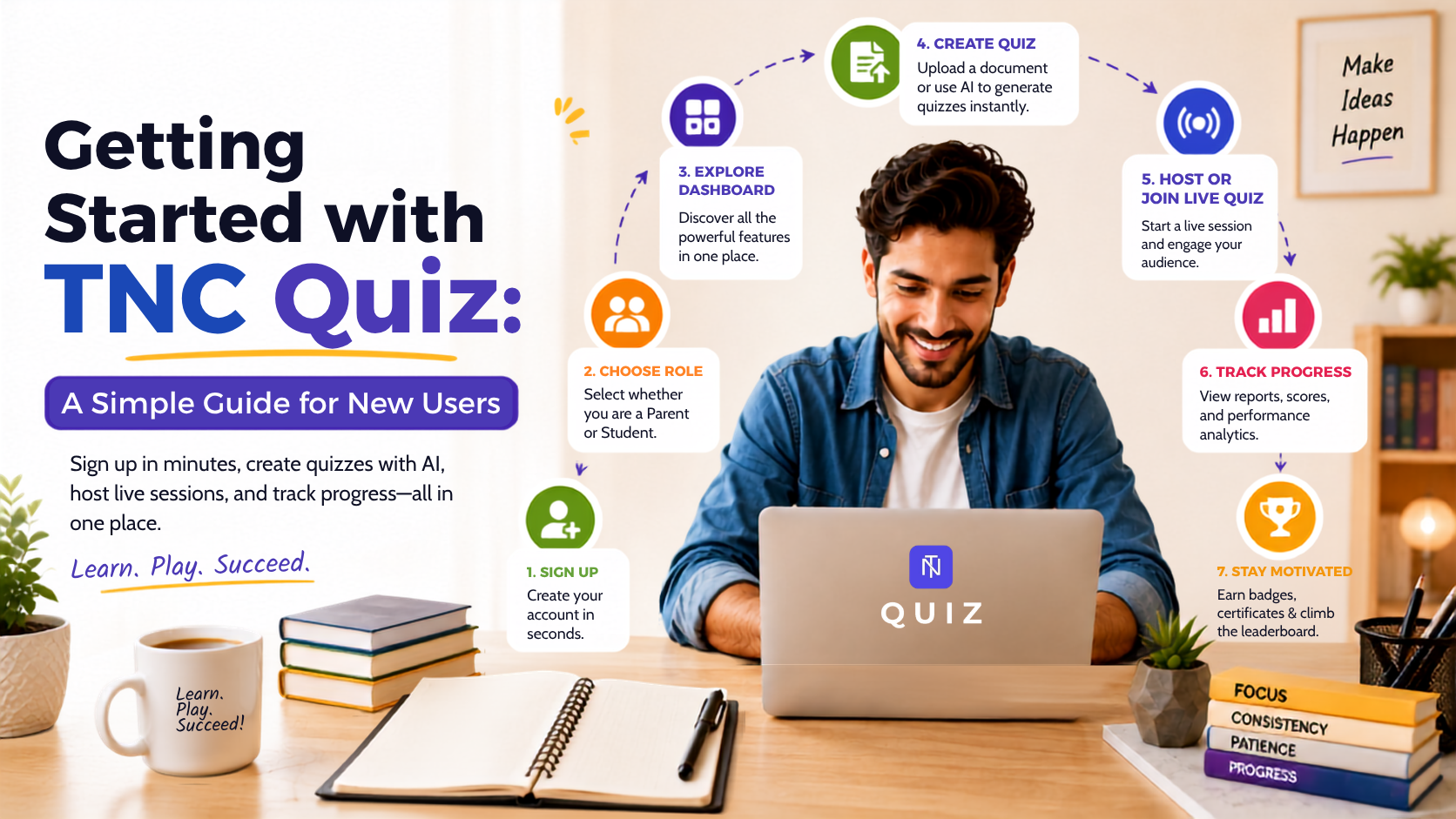
Starting something new can feel
overwhelming, especially when a platform has a lot of features packed into it.
The good news? Getting started with TNC Quiz
is refreshingly simple. Whether you're a teacher, a student, a business
trainer, or a parent looking for a fun learning tool, signing up takes just a
couple of minutes and you'll be creating or joining quizzes right away.
Here's a complete walkthrough of how
new users can get started on TNC Quiz.
Step 1: Click "Get Started"
Every page on TNC Quiz includes a Get
Started button in the top navigation. Clicking it takes you straight to the
registration page, where you can create your account and land directly on your
personal dashboard once signup is complete. There's no long, confusing
onboarding process, just a direct path from sign-up to your first quiz.
Step 2: Choose Who Will Use TNC Quiz
Once you land on the registration
page, TNC Quiz asks a simple but important question: "Who will use TNC
Quiz?" New users pick one of two options:
●
Parent - For parents who want to track their child's quizzes and progress
from their own account.
●
Student - For kids and learners who will be the ones taking quizzes and
earning badges themselves.
This step ensures the platform is set
up correctly from the very start, whether it's a parent overseeing their
child's learning journey or a student jumping in directly to play and learn. If
you already have an account, there's also a quick Log in link right on
the same screen, so returning users don't have to go looking for it.
Step 3: Create Your Account
After selecting a role, new users
simply enter their basic details to finish setting up their account. Once
registration is complete, TNC Quiz automatically takes you to your dashboard,
your home base for everything you'll do on the platform, from creating
quizzes to joining live sessions and tracking progress.
Step 4: Explore Your Dashboard
The dashboard is where all the action
happens. From here, new users can:
●
Create a new quiz using the AI
quiz generator
●
Browse the quiz library for
ready-made quizzes
●
Host or join a live quiz
session
●
Track scores, progress, and
performance analytics
Because everything is centralized in
one place, new users don't need to jump between different tools or tabs to get
things done.
Step 5: Start with the Free Plan
TNC Quiz makes it easy to try the
platform risk-free with a Free Plan, which includes:
●
3 lifetime document uploads
●
AI-powered quiz generation
●
Instant scoring and reports
●
Support for PDF, Word, Excel,
and image uploads
This means a new user can immediately
upload a document like class notes, a training manual, or study material and
let the AI turn it into a ready-to-use quiz within moments. For users who want
unlimited quiz generation, higher daily upload limits, and full access to the
quiz library, TNC Quiz also offers a Pro Plan with advanced features and
priority AI processing.
Step 6: Create Your First Quiz
New users have two easy options to
build their first quiz:
- Use AI Quiz Generation - Upload a
PDF, Word document, image, or notes, and let TNC Quiz's AI automatically
generate multiple-choice questions based on the content.
- Browse the Quiz Library - Choose
from thousands of ready-made quizzes across categories like science,
mathematics, business, languages, and general knowledge.
Either way, there's no need to build a
quiz completely from scratch unless you want to. TNC Quiz is designed to
save time for first-time users.
Step 7: Host or Join a Live Session
Once a quiz is ready, new users can
immediately try TNC Quiz's standout feature: Live Quiz. Hosting a
session generates a room code and QR code that participants can use to join
instantly from any device with no separate accounts needed for players. This
makes it incredibly easy for a new user to run their very first interactive
quiz session for a class, team, or group of friends within minutes of signing
up.
Step 8: Track Progress and Stay Motivated
As new users continue using the
platform, TNC Quiz keeps things engaging with:
●
Real-time performance analytics
and reports
●
Achievement badges,
certificates, and learning streaks
●
Live leaderboards during quiz
sessions
This turns the first-time experience
into something users want to come back to, rather than a one-time signup.
Why the Sign-Up Process Works So Well for Beginners
TNC Quiz's onboarding is built around
one goal: getting new users from sign-up to their first working quiz as fast
as possible. There's no steep learning curve, no need to manually write
dozens of questions, and no complicated setup. The AI does the heavy lifting,
and the dashboard keeps everything organized in one place.
For teachers, trainers, students, and
even parents exploring quizzes with their kids, this simplicity is exactly what
makes TNC Quiz approachable, whether it's someone's first time creating a quiz
or their hundredth.
Final Thoughts
Getting started with TNC Quiz takes just a few steps: click Get Started,
choose whether you're signing up as a Parent or a Student, create your account,
land on your dashboard, and start generating or hosting quizzes almost
immediately. With a free plan to try things out and AI doing most of the setup
work, new users don't need any prior experience to get real value from the
platform right away.
Ready to try it yourself? Head to tncquiz.com and click Get Started to
create your first quiz today.
TNCQuiz Team
Building TNCQuiz — interactive quizzes that make learning easier, more engaging, and more memorable.
Try TNCQuiz free